
The radio connection
OM0RX xCat
A native Mac bridge between CAT-aware logging software and a FlexRadio station, with a compact station monitor.
Apple Silicon · macOS 14+Free download · 0.5.2
Download xCat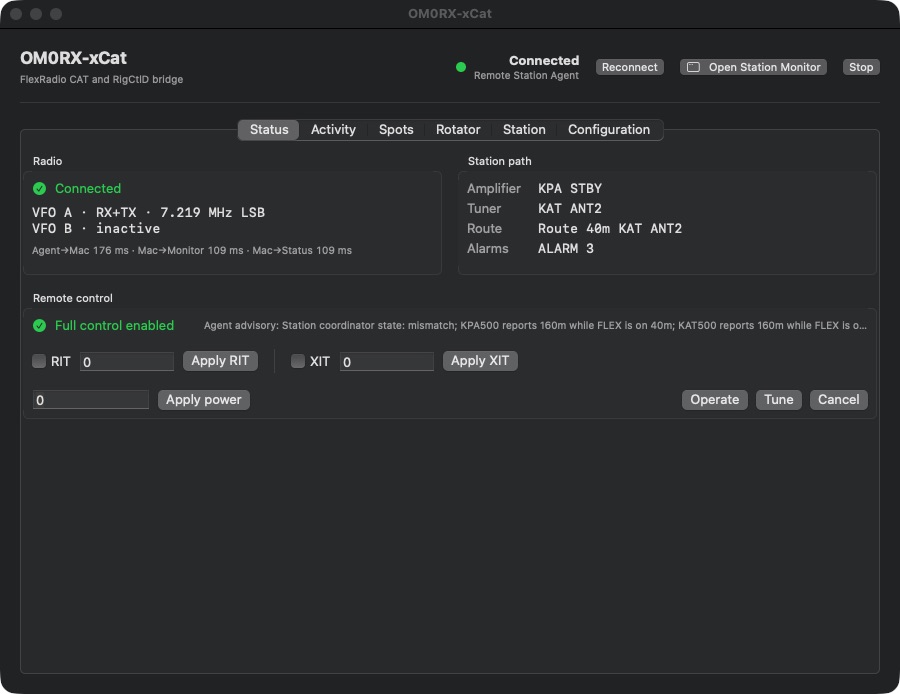
Built around the operator
The radio connection.
xCat connects the logging workflow to a FlexRadio station through local Kenwood TS-480 CAT and Hamlib RigCtlD interfaces. Its native Mac interface keeps observed radio state, connection health and the station monitor together.
The published build includes native SmartLink handling and an independently configurable Remote Station Agent connection. Its station monitor can remain in the menu bar or open in a movable window, with radio and rotator context close at hand.
In the workspace
What you can do.
Observed VFO state
Separate A/B frequency, mode and RX/TX roles, including split reporting from the radio’s actual state.
Local CAT interfaces
Loopback TS-480 and RigCtlD services connect compatible logging clients. Transmit controls are opt-in.
Station monitor
Radio, amplifier, tuner, route and advisory information share a compact operating view.
Spots and rotator
RUMlogNG spot forwarding and an independent Mac DCU-1 rotator connection support configured stations.
Availability
At your station.
- Current version
- 0.5.2 · build 15
- Platform
- Apple Silicon · macOS 14+
- Cost
- Free
Before you begin
- Apple Silicon Mac running macOS 14 or later.
- A compatible FlexRadio connection or configured Remote Station Agent.
- The Mac archive does not include a standalone Windows Remote Station Agent installer.
Developer ID signed with hardened runtime; not Apple-notarized. This release updates versioning and packaging; the radio runtime is unchanged from 0.5.1. Fresh radio mode is Simulator. Inspect imported rotator settings and AutoConnect before use near live hardware. Live radios, SmartLink, Remote Agent, rotator and Gatekeeper launch acceptance were not tested for this package. Independent software; no provider endorsement is implied.
Request source code ↗Download xCat
Free access to the Mac application and its matching source snapshot. Development repositories and history remain private; these release archives include the applicable licence and notices.
3.25 MB · Apple Silicon · macOS 14+
Verify SHA-256 checksum
87c1c026b1397bd98793d127131f39b08a06b74b678c02dd1e1481072d5c98133.50 MB · Source for this exact release
Verify SHA-256 checksum
a6375e78b1aa43042da97adbd04692f7b57940bd3e1e2fbcb8eff48465b25757To install, extract the application ZIP, move the app to Applications and review its settings before connecting your station. These signed builds are not notarized; macOS security checks may prevent launch. The source ZIP is provided alongside the executable at no charge. See its LICENSE and NOTICE for redistribution and source rights.